
A Full Disk Is a Normal Day
An edge box has one disk, nobody watching it, and a job that gets harder exactly when the network goes away. During a long outage, everything the box cannot send piles up on that disk. Sooner or later, the disk runs out.
We tend to treat a full disk as an accident: something an operator should have prevented, a case for the runbook. At the edge it is not an accident. It is arithmetic. A buffer that holds data while a destination is down grows for as long as the outage lasts, and outages do not end on schedule. Add a log file that grew, a backup someone copied over, a snapshot that froze the volume for a minute, and the disk becomes the part of the system most likely to say no.
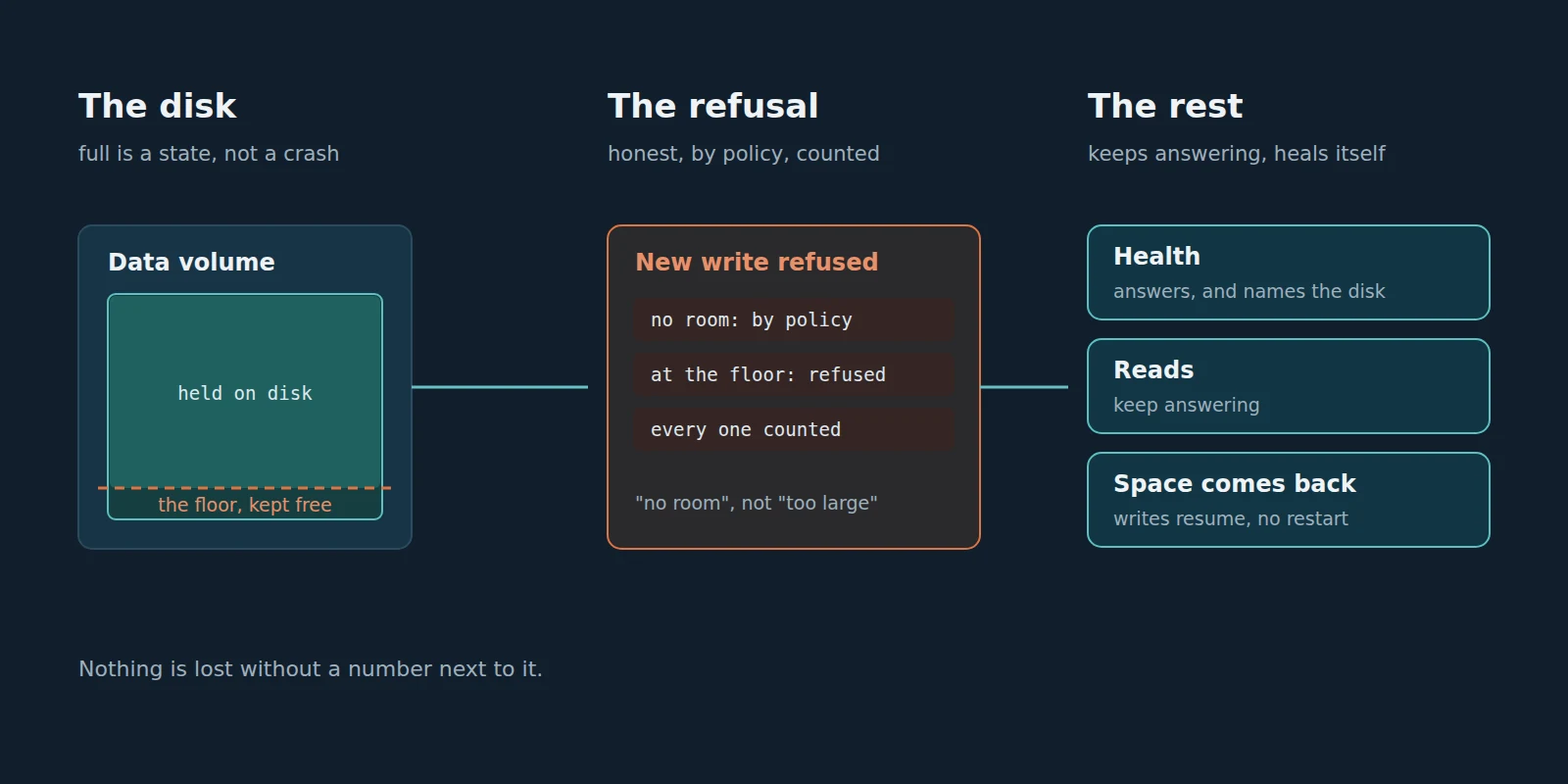
My position is that a data platform should be designed for the disk saying no, the same way it is designed for the network saying no. That means four duties. Refuse honestly. Count exactly what it could not keep. Keep the rest of the system answering. And recover by itself when space comes back, without waiting for someone to restart it.
None of these is exotic. What makes them hard is that a full or frozen disk does not fail loudly. It fails sideways, in code paths that were never written with it in mind. This article is about those paths, and about what we found when we filled our own disk on purpose.
What a Full Disk Did to Us
We built a test that does what an edge box does on a bad day: a long outage to the destination, data still flowing, and a data volume that runs out of room in steps, then all the way to zero bytes, then is freed again. We also froze the volume outright.
The results, before we fixed what they showed, were humbling.
- Small writes were refused as “message too large”. As the room above the safety floor ran out, writes of about a kilobyte were refused with a reason that was simply wrong: 478 of them, and the ones kept in Failed messages carried the advice to raise the buffer’s capacity. The buffer’s drop policy, the rule the operator had chosen for exactly this moment, was never asked.
- The buffer died quietly until a restart. Once another program took the volume to zero bytes, the parts of the platform that had met the full disk stayed unwritable even after the space was freed. The store-and-forward backlog moved 32 writes in about five minutes, and new writes queued behind it. Nothing said why.
- Logins hung. In the same state, audit records could not be written, and every request that writes one waited for it. Sign-in did not answer within 30 seconds, minutes after the disk had room again.
- A frozen volume stalled the whole process. During a 45 second freeze, the process’s heartbeat stopped for 40 seconds. Not only the writes: everything.
- A nearly full volume could not even boot. With under about 5 GB free, the platform’s own internal streams reserved more than the space it allowed itself, so the box that needed to show “your disk is full” never came up to show it.
The good news was in the books. The frozen-volume runs lost nothing, and in the zero-bytes runs every write that never arrived was counted or still waiting in the buffer. But a platform that keeps its books straight while it hangs a login and waits for a restart that nobody at a remote site will do is not doing its job.
Four Duties When the Disk Runs Out
A disk filling up is not one event. It is a sequence, and the platform owes a different answer at each step.
Refuse honestly
When there is no room, a write will be refused. That is fine. What matters is the reason, because the reason is what the operator acts on. “Message too large” sends someone to raise a capacity setting that was never the problem, while the disk keeps filling. The honest reasons are the boring ones: no room, so the output’s drop policy decided (refuse the new write, or evict the oldest one); or the volume reached its floor, the space the platform keeps free so the rest of the system can still breathe.
The floor deserves a sentence of its own. A platform should never be the program that fills the disk to zero. MaestroHub keeps a free-space floor on its data volume (by default 5 percent of the volume, kept between 2 and 10 GiB). At the floor, new values and new buffered messages are refused and counted, data already past its retention is reclaimed at once, and nothing inside a retention window is ever deleted to make room. That last rule is the point: a platform that silently deletes recent data to stay alive has turned a refusal into a loss nobody chose.
Count exactly
A refusal you cannot count is a loss you cannot explain. In Delivered Must Mean Delivered I argued that after an outage the books have to close: what was held equals what was delivered, what is still waiting, what sits in Failed messages, and what was lost. A full disk is where that ledger earns its keep, because a full disk is where losses actually happen.
Here is one of our runs after the fixes, with the output set to refuse new writes when there is no room. The test fired 18,274 writes during the run. 13,054 never reached the destination, and every one of them had a line in the books: 574 refused by the drop policy when the room ran out, and 12,480 refused at the floor. 574 plus 12,480 is 13,054. Missing equals counted. Zero silent.
That equation is the whole duty. Not “few were lost”, not “we logged a warning”. Every write the platform could not keep has a number next to it and a reason, and the numbers add up.
Key idea
Running out of disk is allowed. Losing data on it is sometimes unavoidable. Losing data without a count and a reason is a design failure, every time.
Keep the rest answering
A disk problem should degrade the things that write to that disk, and nothing else. Health checks, reads and the screens an operator uses to understand the problem have to keep working, because they are how anyone finds out what is wrong.
This is the duty that surprised us most, because the failures came from places that had nothing to do with store-and-forward: an audit write that every login waited on, a database that answered reads through the same single connection as a write that could not finish, a health check that asked a stuck component how it was doing and waited for the answer.
Recover by itself
At a remote site, “restart the service” is not an instruction. It is a ticket, a phone call and a drive. A platform that needs a restart to notice the disk has room again has turned a ten-minute disk problem into a day of missing data. When space comes back, the platform should find out, reopen what it closed, and resume, on its own.
A Frozen Disk Is Worse Than a Full One
A full disk at least answers: it says no, fast. A frozen disk does not answer at all. A snapshot freeze, a failing drive or a storage controller having a bad minute leaves every write simply waiting.
Waiting is the dangerous part, because waiting spreads. Anything that holds a lock while it writes now holds it forever. Anything that waits for that lock waits too. And some waits are invisible in the code entirely.
Ours was one of those. The embedded database kept the index of its write-ahead log in a memory-mapped file. A memory-mapped file looks like ordinary memory to the program; touching it can quietly turn into disk I/O. The evidence pointed to one thread touching that memory on the frozen volume and blocking inside the operating system. The Go runtime, at its next garbage collection, has to pause every thread for a moment, and it cannot pause one stuck in the kernel. So the whole process stopped: health, sign-in, reads, everything, for as long as the disk was frozen. When we moved that index into ordinary heap memory, the whole-process stop went away.
The memory-mapped file was the dramatic case, but it was not the only wait that spread. We found the same shape again and again: a request that waited on a write it did not need to wait for. Each fix had the same form. Separate what must wait from what must not. Reads go through their own connections, so they never queue behind a write that cannot finish. An audit write holds its caller for at most a second; the write carries on in the background for up to ten seconds, and one that still cannot be stored is logged. A health check asks with a time limit, and when the answer does not come, the lack of an answer becomes the answer.
That last rule is worth generalising. A health check that hangs when the system is unhealthy is worse than no health check, because it tells monitoring nothing at the one moment monitoring matters. Health has to answer fastest exactly when everything else is slow.
The Restart Nobody Will Do
The hardest bug was not the full disk. It was what stayed broken after the disk was no longer full.
When the volume reached zero bytes, a write inside the platform’s message store failed. The store remembered that failure and kept refusing that stream, even after space came back, until the process restarted. The store-and-forward buffer was one of those streams. So was the audit trail. Space was free, the destination was back, and nothing moved.
We had two honest choices. Say it, loudly: mark health down, name the stream, log it once, tell the operator a restart is owed. Or fix it: notice that the volume is back above its floor, and reopen the store from its files inside the running process. We did the first immediately, because a silent failure is the worst kind. Then we did the second, because “a restart is owed” is still a restart nobody will do.
Now, once the volume is back above its floor, the platform reopens the store over the files it already has. Everything on disk is recovered from disk. The few streams that live only in memory are sealed, copied and created again with what they held. Health goes back up. In our runs this happened about a minute after the space was freed, and every write sent in the 20 seconds after the fault landed, with no restart: all of them, in every run.
A restart is still the last resort if the reopen itself fails. That case is logged and shown in health. In none of our runs did it happen.
Questions for Your Own Platform
You do not need our product to ask these. You need a spare volume and an afternoon.
Fill a disk on purpose before your site does it for you.
- When the data volume runs out of room, what reason does your platform give for the first refused write? Is it the real one?
- Does your platform keep a floor, or will it be the program that takes the disk to zero?
- To make room, does it ever delete data that is still inside its retention window? Would you know?
- After a full-disk episode, does missing at the destination equal what the platform counted as lost or set aside?
- While the data volume is frozen, does the health check answer, and does it say why? Do reads answer? Does sign-in?
- When space comes back, does everything resume by itself, or does someone have to restart something?
What Filling Our Own Disk Found
We ran these faults against the whole application on a test machine: a real Kafka destination behind a proxy we could cut, a data volume we could size, fill and freeze from underneath, and a test that fired writes the whole time and then read the destination back.
After the fixes, these are the results that matter:
- Honest refusal by policy. With the output set to refuse new writes, the room running out produced refusals by the drop policy first (574 in the run above), then refusals at the floor (12,480). None was called “message too large”, and every one was counted.
- Every missing write counted. In every full-disk run, each write missing at the destination was accounted for as refused, evicted or set aside in Failed messages. Zero silent.
- Recovery without a restart. Taken to zero bytes and then freed, the store reopened itself about a minute later, and every write sent in the 20 seconds after the fault landed, between 577 and 999 per run, with none missing.
- A 90 second freeze, answered. While the data volume was frozen, health answered within a millisecond and named the frozen data volume. Reads answered in about a millisecond. Sign-in was refused with its reason instead of hanging. After the thaw, every missing write was accounted for, with no copies and, with the output set to In order, nothing out of order.
- Losses remembered across a freeze. A loss that cannot be recorded because the disk is frozen is held and written into the books once the disk answers again.
The same work also fixed the boot: a volume with only a few gigabytes free now starts, so it can show you that it is full.
Where This Stands, Honestly
Five things worth saying plainly.
First, a refusal is still a refusal. When the disk is full, new data is not kept. The platform’s job is to choose by your policy, say so and count it, not to make disk appear. How long a buffer can hold depends on your data rate and your disk, and the platform shows how long the fastest-filling buffer can keep going rather than promising a number of days.
Second, a count of losses held during a freeze waits in memory until the disk answers. If the process stops before then, those counts go with it.
Third, the floor cannot stop another program from filling the disk. What the platform can do, and does, is keep answering, say what happened, and recover once space is back.
Fourth, the audit trail writes to the same disk. During a long freeze, an audit record that cannot be stored within its ten seconds is logged, not kept.
Fifth, what a write that ran out of time during a freeze becomes is “possibly sent”, not “delivered” and not “failed”. That outcome, and why it is the honest one, is the subject of Delivered Must Mean Delivered.
The Question I Want to Leave You With
When your edge disk fills up, who finds out first: your platform, or the person reading a report three weeks later?
If the honest answer is the person with the report, the disk is not your problem. Your platform’s silence is. I would rather a platform refused a write and told me why, counted every one it could not keep, kept answering while it was in trouble, and picked itself up when the space came back. That is less impressive on a slide than a promise that the disk will never fill. It is also the only promise anyone can keep.
If you would like to compare notes on how you test your own edge boxes, get in touch.