
A Setting That Sounds Like a Guarantee
“In order” is one of the most reassuring words a data pipeline can show you. It sits on an output, you tick it, and it feels like a promise about what the destination will receive.
It is a promise. It is just a smaller one than it sounds. An in-order output can keep the order of what it is handed. It cannot restore an order that was lost before the data reached it, and it cannot even see the hops where that happens.
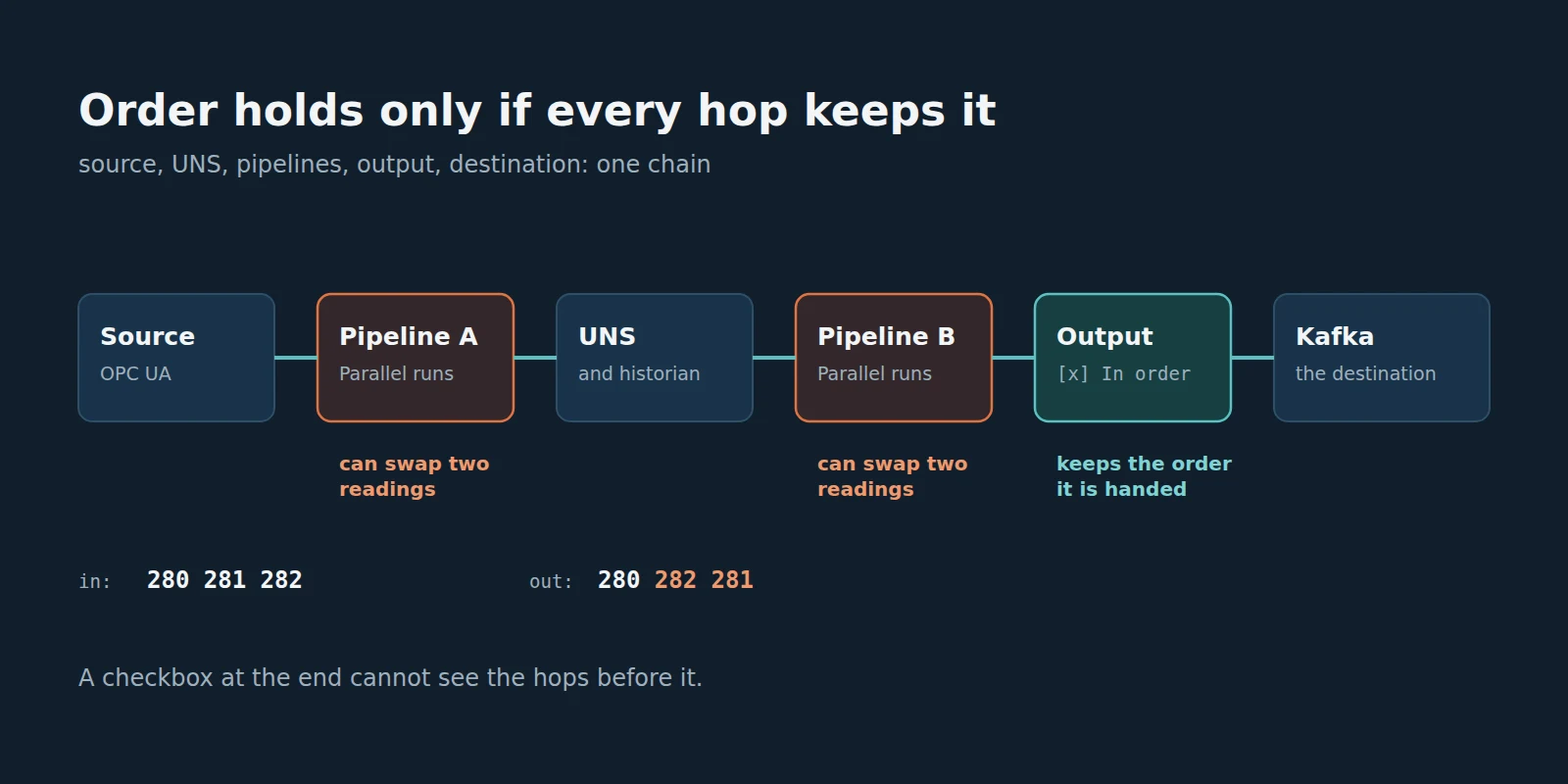
My position is that order is not a feature of any single component. Order is a property of the whole chain: the source, the namespace or historian in the middle, every pipeline the values pass through, the output, and the destination. If one hop runs things in parallel, the chain does not keep order, whatever the last checkbox says.
This sounds obvious written down. In practice it is easy to miss, because every hop looks correct on its own. Our pipelines did what they are documented to do. We nearly missed the point in how we explained the product, and an evaluator’s test showed us why.
What Replaying a Real Setup Showed
An evaluator tested our store-and-forward against Kafka with a long list of outages. We rebuilt the evaluator’s setup as closely as we could and ran the whole matrix again, so we could see what the evaluator saw.
The setup was ordinary for a plant. An OPC UA server feeds a first pipeline, which publishes each reading into the Unified Namespace, where the historian stores it. A second pipeline subscribes to those topics and sends every reading to a three-broker Kafka cluster, through an output set to In order. Then the network to Kafka is cut, for anything from a short break to a long outage, and restored.
On MaestroHub 3.1, the results were what you want from store-and-forward. Every reading the historian held was in Kafka afterwards. None was missing and none arrived twice. (Another article in this series, Delivered Must Mean Delivered, is about why those two numbers are the hard ones.)
And yet on four of the runs, some readings were out of order. Two on a short cut. Then 45, 57 and 69 on the long cuts. A few dozen at most, in runs of 6,500 to 182,000 readings, never a reading lost or doubled. Small numbers. But the output said In order, and for some destinations a single swapped pair is a wrong answer: the “latest value” of a setpoint, a counter, a sequence a downstream system checks.
The natural suspect was the buffer. It had just held a backlog through a long outage and replayed it. If anything shuffled the readings, surely it was the part that stored and resent them.
The Buffer Was Not the Culprit
The evidence pointed upstream of the buffer, at the pipelines.
Three things moved us off the buffer:
- The first swap happened with no outage at all. On the short-cut run, the two out-of-order readings were from a quiet stretch before the cut. The link was up and nothing was being buffered. One reading had simply reached the output noticeably later than the next one.
- The count followed the readings, not the outages. The swaps showed up on long runs on a busy test machine, and the count tracked how many readings went through rather than how long or how often Kafka was away.
- The buffer keeps order when we control what goes in. When a test hands an in-order buffer its records in a known order and cuts the link mid-stream, the records come out in that order, every time. Our long outage runs that feed the buffer one record after another show none out of order.
So what sits between the source and the output? Two pipelines, both on the default Run order, which is Parallel.
I want to be precise about what we did and did not prove. We did not catch one of the long-run swaps in the act. And when we ran a long cut twice side by side, once with both pipelines in Parallel and once with both running one at a time, both came out clean. Swaps this rare do not show up on demand. What we can say is that the evidence points away from the buffer, that the first swap happened with nothing buffered, and that Parallel runs are allowed, by design, to do exactly this.
Parallel Is a Contract, Not a Bug
A pipeline in Parallel starts a run for every value as soon as it can. Runs overlap, and each one finishes when its own work is done. A slower run hands over its value later, even if its value arrived first.
Runs take different times for ordinary reasons: a busy host, a cold cache, the first message on a new topic, a slow lookup. None of that is a fault. It is the whole point of Parallel: a pipeline that does not wait for the previous run is a pipeline that keeps up with a busy plant.
That is why Parallel is our default, and I still think it is the right default. Most industrial readings carry the time they were measured, and most of them go somewhere that sorts by that time: a historian, a time-series table, a dashboard. For those, arrival order does not matter, and paying for it in throughput would be waste.
The trap is the other case. A setpoint where the last write must be the newest value. A running total. A consumer that reads only the latest value of a topic, or that checks a sequence. There, a swapped pair is a wrong result, and Parallel is the wrong choice for every pipeline the values pass through. Our documentation on output order walks through the latest-value case.
Key idea
An in-order output keeps the order it is handed. It does not put overlapping runs back in arrival order, and it cannot see the runs of a pipeline before it.
Order Is a Chain
A chain is as ordered as its least ordered hop. Every hop either keeps order or can break it, and it is worth knowing which is which before you trust what arrives.
Walk the chain from the evaluator’s setup hop by hop:
- The source stamps each reading with the time it was measured. That timestamp is the one piece of order that survives everything, because it travels inside the data.
- The first pipeline turns each reading into a run. In Parallel, two of those runs can finish in the wrong order.
- The Unified Namespace and the historian take what they are given, per topic. The historian sorts by time, so it never notices a swap. That is exactly why a swap can pass through it unseen.
- The second pipeline subscribes and starts its own runs. In Parallel, it can swap two readings again, even if the first pipeline kept them in order.
- The output keeps the order its runs hand it values, through an outage, retries and the drain afterwards.
- The destination keeps order on its own terms. A Kafka topic keeps order within a partition. Our replay used one partition. With several, order holds only within each.
The interesting hop is the one the checkbox cannot see. The In order setting belongs to the output of the second pipeline. The first pipeline is a different pipeline, edited on a different screen, possibly by a different person. Nothing on the output can tell you how the first pipeline runs, because, as far as the output is concerned, its input is just a topic in the namespace.
This is what makes order different from most settings. A timeout, a retry limit, a buffer size: each of those is a property of one component, and you can check it where it lives. Order is a property of a path. To check it, you have to walk the path.
Design for Order, or Design Without It
Once you see order as a chain, the choices get clearer. There are really two honest designs, and one comfortable mistake.
The first honest design is to keep order at every hop. In MaestroHub that means setting the run order to One at a time, in arrival order on every pipeline the values pass through, not only the last one, and setting the output to In order. When one pipeline publishes to the namespace and another subscribes to it, that means both. You pay for it in throughput, on those pipelines only: their runs no longer overlap. Our run order documentation says what is kept, through retries, restarts and failovers, and what it costs.
The second honest design is to not depend on arrival order at all. If every reading carries the time it was measured, and the consumer orders by that time, then a swap in transit changes nothing. This is how historians already work, and for a great deal of industrial data it is the better design: cheaper, faster, and unaffected by a swap at any hop you did not think about.
The comfortable mistake is the one in between: Parallel pipelines, an In order output, and a consumer that trusts arrival order. Everything is green. Every component behaves as documented. And once in a few thousand readings on a busy day, the consumer is wrong.
Key idea
Either keep order at every hop and pay for it, or carry the time in the data and stop depending on arrival order. A checkbox at the last hop is neither.
The questions are the same whatever product you run.
Questions for any chain that has to deliver in order.
- Write down every hop between the source and the destination. Which of them can run two things at once?
- For each hop that can, is it set to keep order, and who owns that setting?
- When one flow publishes into a namespace and another subscribes, does anyone check the first flow's settings when they configure the second?
- Does your destination keep order across its partitions or shards, or only within each?
- Does every value carry the time it was measured, and does the consumer order by that time or by arrival?
- Have you ever counted order at the destination, outside an outage as well as through one?
What the Documentation Said, and Did Not
The answer was not in the code. It was in what we say, and in where we say it.
Our documentation had already said that Parallel runs can publish outputs in a different order than their inputs arrived, and that an in-order output keeps the order its runs hand it. Both were true. What it did not say clearly enough was the chain: that In order on one output says nothing about the pipeline before it, and that keeping order through a namespace means setting the run order on every pipeline the values pass through. The delivery order section of our store-and-forward documentation states the first half: In order keeps the order the runs hand over, and One at a time is how a pipeline keeps arrival order. The chain is the half this essay adds.
MaestroHub 3.1 also puts a warning on the output itself: an output set to In order on a pipeline that runs in Parallel says that its runs can hand records over out of order, and offers to switch that pipeline to One at a time. It is a useful warning, and it has exactly the limit this article is about. It can see its own pipeline. It cannot see the one before it.
Where This Stands, Honestly
Since 3.0: the run order choice per pipeline (Parallel, or One at a time, in arrival order) and the delivery order choice per output (connector default, In order, or Any order), with the store-and-forward buffers behind it.
In 3.0 itself, the same replay found that the buffer could store records out of order during an outage, so they came out of order in the drain, on top of anything the pipelines did. 3.1 fixes that, and its own runs show none of that kind. The measurements in this article are from 3.1, and so is the warning on the output.
Three things worth saying plainly. First, delivery order is a choice per output: in order when the output is set to In order or its connector asks for it; otherwise a newer message may overtake a refused one. Second, we have not reproduced the long-run swaps on demand, and I have stated the evidence above rather than a proof. Third, One at a time removes the pipelines’ freedom to swap by design; we will not tell anyone “zero out of order” for a chain that still runs in Parallel.
The Question I Want to Leave You With
When your destination receives two readings, how do you know they are in the order they happened?
If the answer is “because the output says In order”, walk the chain backwards and ask the same question at every hop. If every hop has an answer, you have an ordered chain. If one hop runs in parallel, you have a checkbox. And if the readings carry their own time, you may not need the order at all.
If you would like to walk a chain of your own with us, or compare notes on how you test order, get in touch.